
Enquiry: (852) 2191 6236


Sage 50 Peachtree Pro Accounting 2023 (Desktop and Cloud Edition)
Easy Startup, Easy to Learn
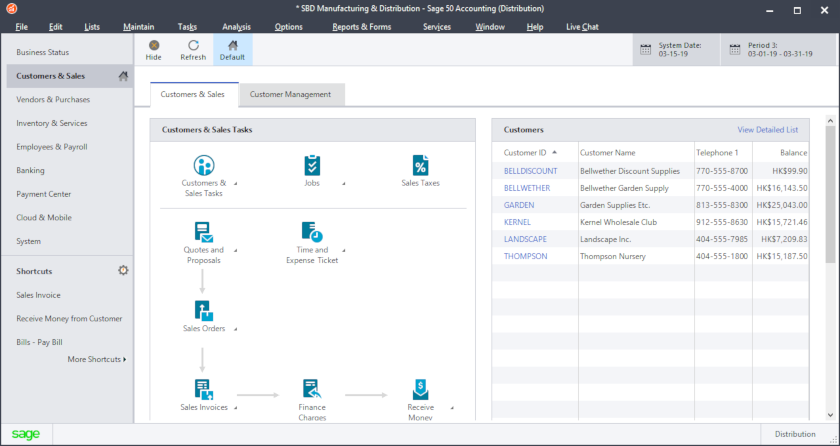
Helpful features like a Setup Guide and Preparation Checklist, Navigation Aids, Wizards, and an Online Tutorial make it easy for you to hit the ground running! With Sage 50 HK Sage 50 HK Peachtree Accounting, you get the tools you need to start working immediately
Improve your cash flow with invoices, payments and expense tracking
Make smarter business and identify opportunities and focus your time on building customer relationships.

Sage 50 Peachtree is not an electronic checkbook. It's a real, double-entry accounting system. Your accountant will appreciate the detail included in Sage 50's financial statements and other reports. There are some initial decisions you should make with your accountant. Then, at tax time you need to provide your accountant with the information he or she needs.
At tax time, print the following financial statements for your accountant:
:: Balance Sheet
:: Income Statement
:: Statement of Changes
In addition, you may want to print the following reports:
:: Aged Receivables
:: Aged Payables
:: Inventory Valuation
Sage 50 Peachtree provides most of the other information your accountant may require.
::Suggest system requirement for Sage 50 Peachtree 2023, 2022 & 2021
※ at least 2.4 GHz processor ;
※ at least 4 GB memory , suggest 8GB or above
※ at least 3 GB harddisk for installation
:System requirement for Sage 50 Peachtree 2023
※Windows® 11.0 & Windows® 10.0
※Windows® Server 2022, Windows® Server 2019 or Windows® Server 2016, Windows Server 2012 R2 (requires installation of KB3118401), along with Remote Desktop Connection or Remote Desktop Web Connection client is required. Windows® 11.0 or Windows® 10.0 peer-to-peer networks (NAS not supported)
※Microsoft®.NET Framework 4.8, including DirectX Dependency for .NET; requires an additional 280 MB to 850 MB
※Excel®, Outlook®, and Word integration requires Microsoft Excel, Outlook, and Word 2013 , 2016 or 2019
※Office 365 Integration – Desktop Edition requires Office 365 Business Premium or Enterprise Editions and Cloud Edition requires Office 365 Business Premium
== > Detailed system requirement for Sage 50 Peachtree 2023, 2022 & 2021